
Podcast categories in AiO Podcast Studio allow you to organise your podcasts by topic and make them easier for visitors to browse on your website. Categories are hierarchical — they support parent and child relationships, which means you can have a top-level category such as Business and a subcategory beneath it such as Entrepreneurship. This mirrors the standard taxonomy used by major podcast directories including Apple Podcasts and Spotify.
Contents
- Import Standard Categories
- Create a Category Manually
- Create a Subcategory
- Edit or Delete a Category
- Assign a Category to a Podcast
Import Standard Categories
The fastest way to populate your categories list is to import the standard set used by Apple Podcasts. This covers 19 top-level genres — Arts, Business, Comedy, Education, Fiction, Government, History, Health & Fitness, Kids & Family, Leisure, Music, News, Religion & Spirituality, Science, Society & Culture, Sports, Technology, True Crime, and TV & Film — each with their standard subcategories. In total, the import adds over 100 ready-to-use category entries.
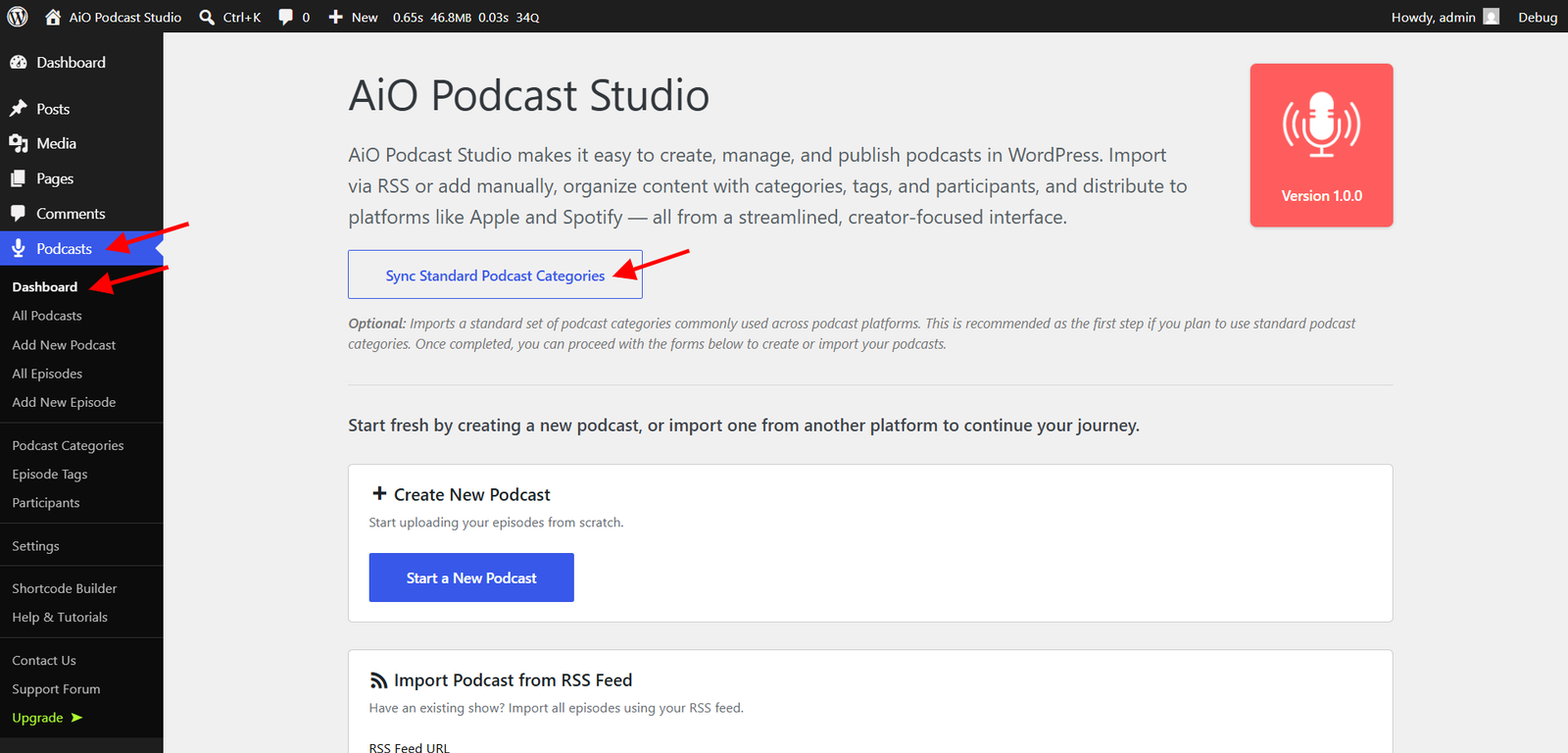
To run the import, navigate to Podcasts → Dashboard. At the top of the page, click Import Standard Categories. The plugin will create all categories and subcategories in a single operation and display a summary showing how many were added, how many already existed, and whether any failed. Once the import has been run at least once, the button label changes to Sync Standard Categories, which you can use at any time to add any categories that may be missing without duplicating the ones already present.
Create a Category Manually
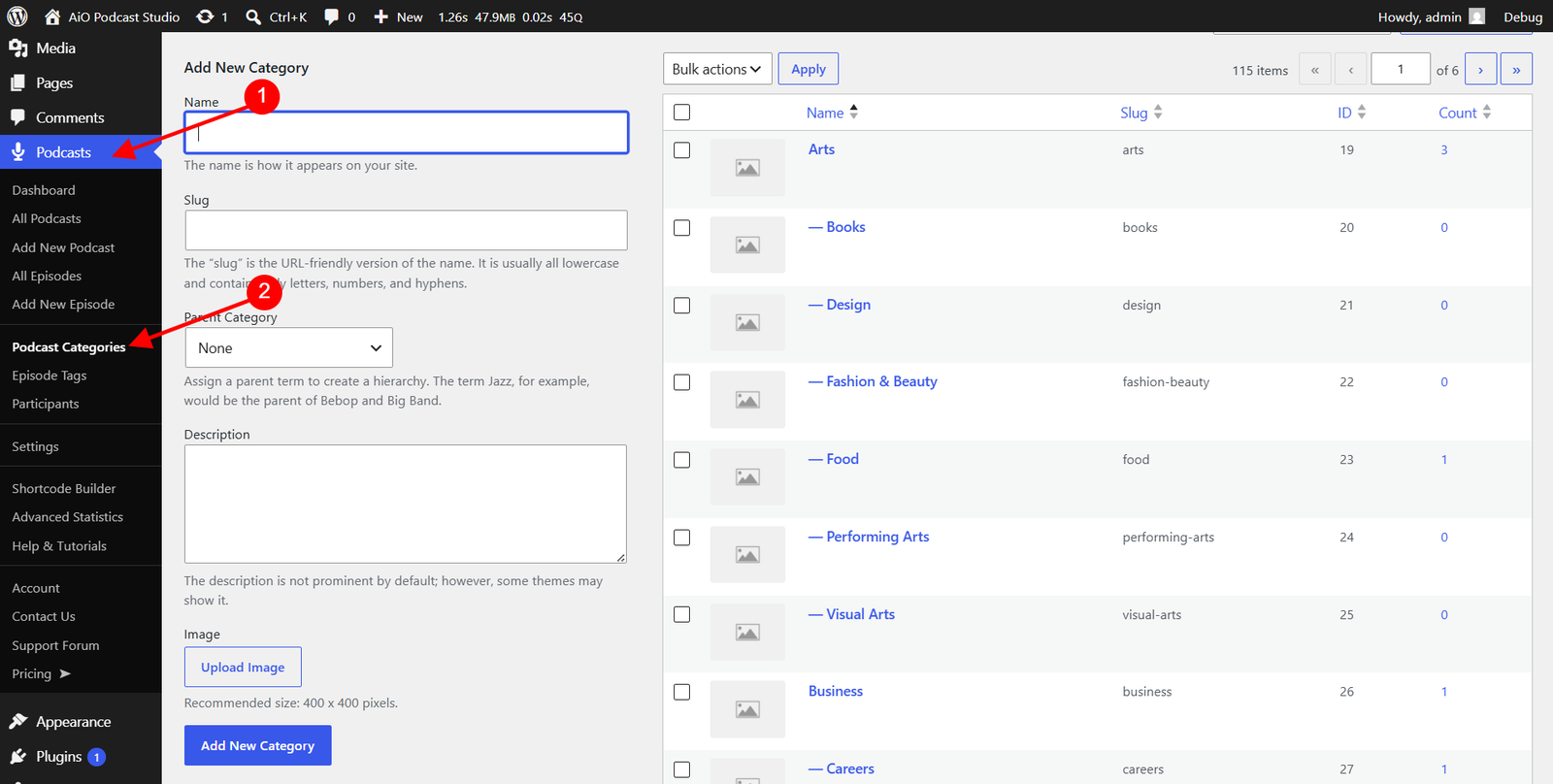
If you prefer to build your own category structure, or need to add a category that is not in the standard set, navigate to Podcasts → Podcast Categories and use the Add New Category form on the left side of the page.
Required field
- Name — The display name of the category as it will appear on your website and in the category list. This is the only field required to create a category.
Optional fields
- Slug — The URL-friendly version of the category name, used in the category’s web address. If left blank, WordPress generates one automatically from the name. For example, a category named Health & Fitness will get the slug
health-fitness. - Parent Category — Leave this set to None when creating a top-level category. To create a subcategory, see the next section.
- Description — A short text description of the category. This can be displayed on the front end of your site depending on the template being used.
- Image — An optional image to represent this category. Click Upload Image to select or upload a file from your media library. The recommended size is 400×400 pixels. This image is available to the category card and grid templates on the front end.
Once the fields are filled in, click Add New Category. The category will appear immediately in the list on the right side of the page.
Create a Subcategory
Subcategories sit beneath a parent category and allow for a more specific level of organisation. For example, you might have Business as a parent and Entrepreneurship and Marketing as subcategories beneath it.
To create a subcategory, fill in the Add New Category form as usual, but before clicking Add New Category, open the Parent Category dropdown and select the category you want this one to sit beneath. The new category will be created as a child of the selected parent and will appear indented beneath it in the category list.
There is no limit to the number of subcategories you can create under a parent. However, podcast directories generally recognise only one level of nesting — a parent and its direct children. Deeper nesting is supported on your WordPress site but may not be reflected in external directory listings.
Edit or Delete a Category
All existing categories are listed in the table on the right side of the Podcasts → Podcast Categories page. The table shows each category’s image thumbnail, name, slug, ID, and the number of podcasts assigned to it.
Editing a category
Hover over a category name in the list and click Edit. The edit screen opens with the same fields as the creation form — Name, Slug, Parent Category, Description, and Image — all pre-filled with the current values. Make your changes and click Update to save them.
Deleting a category
Hover over a category name and click Delete. WordPress will ask you to confirm before proceeding. Deleting a category removes the category itself and unassigns it from any podcasts that were using it. The podcasts themselves are not deleted. If the deleted category had subcategories, those subcategories are not deleted — they remain in the list but lose their parent assignment and become top-level categories.
To delete multiple categories at once, select their checkboxes in the list, open the Bulk Actions dropdown, choose Delete, and click Apply.
Assign a Category to a Podcast
Categories are assigned from the podcast edit screen, not from the categories page. Open the podcast you want to categorise by going to Podcasts → All Podcasts and clicking its title. In the right-hand sidebar, locate the Podcast Categories panel. Check the box next to each category you want to assign to this podcast, then save or update the podcast.
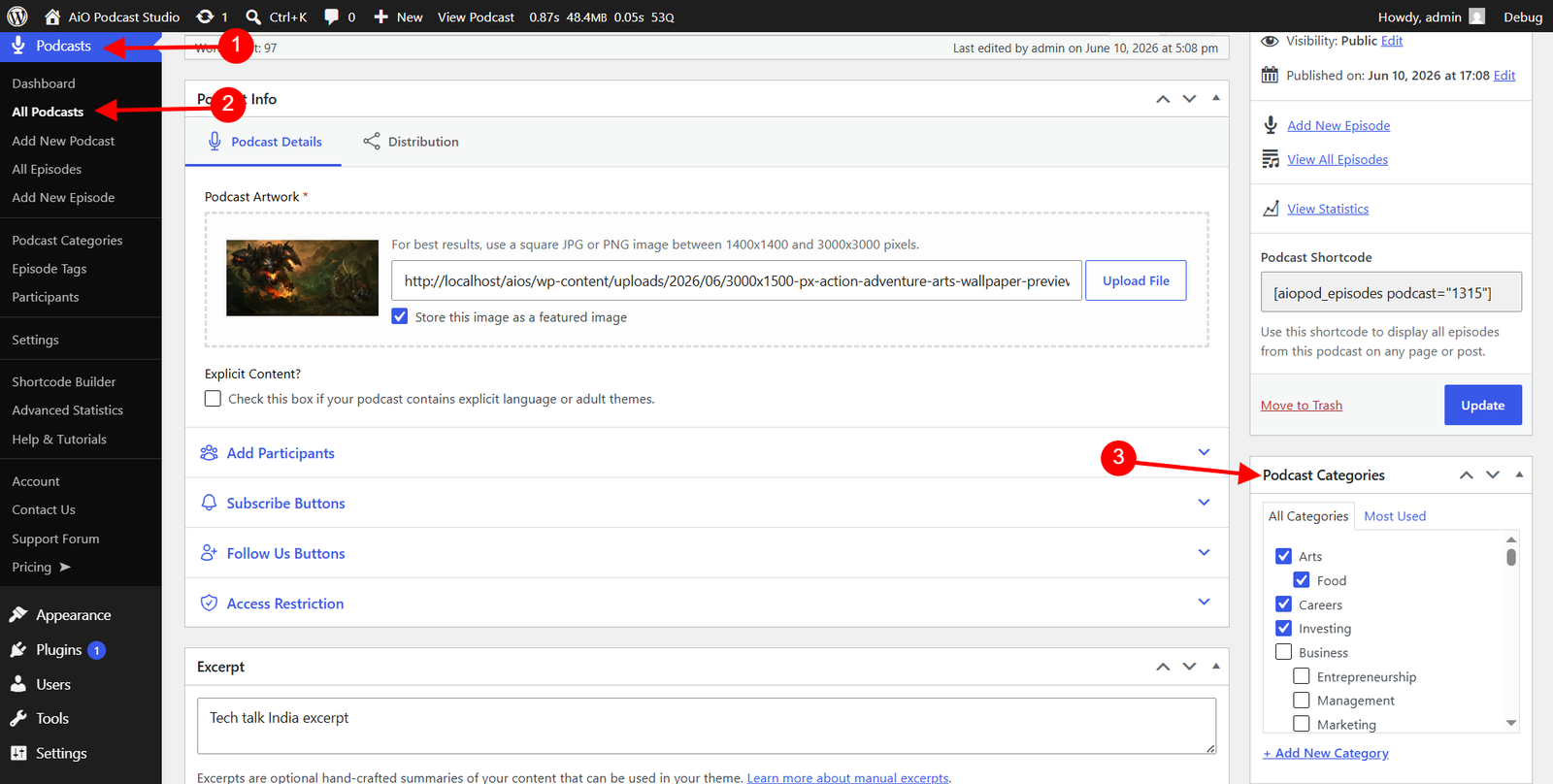
A podcast can be assigned to more than one category. The categories assigned to a podcast are included in its RSS feed and are used by podcast directories to place the show in the correct genre listings.